
 by
by This detailed technical guide presents an advanced NOBGP configuration designed to assign a dedicated static public IP per server via DHCP. We utilize the far gateway routing method to guarantee 100% address utilization of your IP pool (zero IP loss for network, broadcast, or gateway addresses).
This method is ideal for hosting environments (VPS, servers) or when your Virtual Machines (VMs)/servers require a direct public address, eliminating the need for Network Address Translation (NAT).
- Latency Prioritization: Main network traffic continues to use the native Internet connection, ensuring the lowest possible latency for standard user activity.
- Direct IP Allocation: A unique NOBGP public IP is assigned directly to each host (server/VM), allowing for precise public addressing and individual control.
- Zero IP Loss: The Far Gateway routing bypasses the need to reserve addresses for broadcast, network ID, and the local gateway, maximizing your NOBGP block utilization.
- Administrative Access: Main network clients maintain full access to the server networks for easy management and maintenance.
- Fast track: Standard packets are processed via fast track by the router; only tunnel traffic incurs the necessary processing load.
- Public IP Firewalling: Firewall rule examples (e.g., controlling port 80 access) to protect your network.
- Target Environment: This configuration was developed and tested on a MikroTik hAP ac² running RouterOS 7.20.6. (The logic remains adaptable to other RouterOS devices.)
- Starting Point: The configuration assumes a “clean slate” environment; the default configuration must be erased prior to starting the setup.
- Security Foundation: The guide incorporates a basic firewall with default drop policy to secure the router and enforce traffic control.
Bypass CGNAT & Dynamic IPs: NOBGP static Public IP is directly routed
Discover nobgp by servperso: Static public IPs and IP pools are routed directly to your network via a high-availability VPN tunnel.
Schema
Physical network
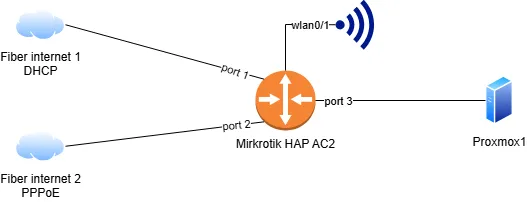
High-level design of implemented solution
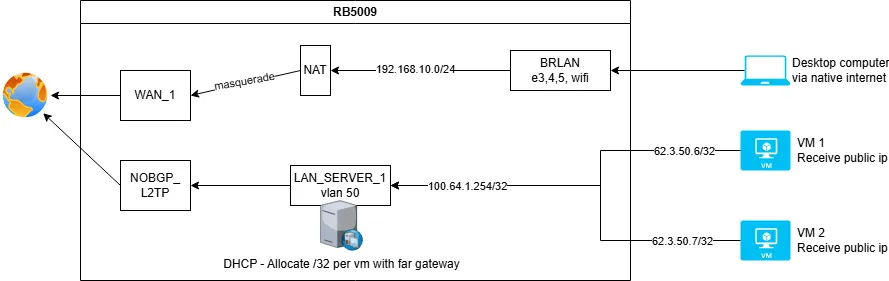
Example resources used in this guide
For this demonstration, we are utilizing the following NOBGP account details. Users must replace these addresses with their own static IPs provided by servperso.
Tunnel Interface IP: 194.28.98.40 (This address is assigned to the main NOBGP L2TP tunnel interface on the router.)
Routable IP Block: 62.3.50.6/31 (This subnet provides two public IPs that will be directly routed to the target servers/VMs using the Far Gateway method.)
Initial router base configuration (Pre-NOBGP)
This section details the base network setup, including interfaces, local networks, and initial firewall rules, prior to integrating the nobgp VPN tunnel. We strongly recommend completing these steps first. A complete, combined configuration script (including all nobgp settings) will be provided at the end of this article for quick deployment.
# 2025-12-08 15:00:10 by RouterOS 7.20.6
# software id = RETRACTED
#
# model = RBD52G-5HacD2HnD
# serial number = RETRACTED

/interface bridge
add name=BRLAN

/interface ethernet
set [ find default-name=ether1 ] name=WAN_1
set [ find default-name=ether2 ] name=WAN_2

/interface pppoe-client
add add-default-route=yes default-route-distance=31 disabled=no interface=WAN_2 name=WAN_2_PPPOE password=RETRACTED user=RETRACTED

/interface list
add comment="List public interfaces" name=WANS
add comment="List private interface" name=LANS

/interface wireless security-profiles
set [ find default=yes ] supplicant-identity=MikroTik
add authentication-types=wpa2-psk mode=dynamic-keys name=SERVPERSO_LABO_WIFI supplicant-identity="" wpa2-pre-shared-key=RETRACTED

/interface wireless
set [ find default-name=wlan1 ] frequency=auto mode=ap-bridge security-profile=SERVPERSO_WIFI ssid=SERVPERSO_LABO wps-mode=disabled
set [ find default-name=wlan2 ] band=5ghz-n/ac channel-width=20/40mhz-Ce disabled=no frequency=auto mode=ap-bridge security-profile=SERVPERSO_WIFI ssid=SERVPERSO_LABO wps-mode=disabled

/ip pool
add name=POOL_LAN ranges=192.168.10.100-192.168.10.149

/ip dhcp-server
add address-pool=POOL_LAN interface=BRLAN lease-time=8h name=DHCP_LAN

/interface bridge port
add bridge=BRLAN interface=ether3
add bridge=BRLAN interface=wlan2
add bridge=BRLAN interface=wlan1
add bridge=BRLAN interface=ether4
add bridge=BRLAN interface=ether5

/interface list member
add interface=WAN_1 list=WANS
add interface=WAN_2_PPPOE list=WANS
add interface=WAN_2 list=WANS
add interface=BRLAN list=LANS

/ip address
add address=192.168.10.254/24 interface=BRLAN network=192.168.10.0

/ip dhcp-client
add default-route-distance=30 default-route-tables=main interface=WAN_1

/ip dhcp-server network
add address=192.168.10.0/24 dns-server=192.168.10.254 gateway=192.168.10.254

/ip dns
set allow-remote-requests=yes

/ip firewall filter
add action=fasttrack-connection chain=forward comment="Established connexion fast track" connection-state=established,related hw-offload=yes
add action=accept chain=forward comment="Allow port forward" connection-nat-state=dstnat
add action=accept chain=forward comment="Allow forward to public internet" out-interface-list=WANS
add action=accept chain=input comment="Allow estabished/related IN" connection-state=established,related
add action=accept chain=forward connection-state=established,related
add action=accept chain=input comment="Allow ICMP IN" protocol=icmp
add action=accept chain=forward protocol=icmp
add action=accept chain=input comment="Allow all input packet from non wan interface (lan)" in-interface-list=LANS
add action=drop chain=input comment="Default policy: drop everything else"
add action=drop chain=forward

/ip firewall nat
add action=masquerade chain=srcnat comment="Source nat masquerade - Internet" out-interface-list=WANS
Configure nobgp on HAP AC2
Creating a dedicated routing table for NOBGP
Implementing this dedicated routing table is the foundation of our Policy-Based Routing (PBR). It mandates that any outbound traffic sourcing from one of your NOBGP public addresses must be directed exclusively back through the NOBGP VPN tunnel.
Without it, your native Internet Service Provider (ISP) would block these packets using anti-spoofing countermeasures (such as uRPF checks). These mechanisms automatically drop any packet carrying a NOBGP public source IP because it does not originate from the network pool assigned by your ISP.
/routing table
add disabled=no fib name=NOBGP
Add new interfaces and IP networks on the LAN side
In this step, we define the VLAN interface on the main bridge and assign its local, private IP address range. This bridge network will be responsible for connecting the servers/VMs.
This new network functions as a public DMZ where the NOBGP static public IPs will be assigned directly to the VMs via DHCP.
Create VLAN
/interface vlan
add interface=BRLAN name=VM_VLAN vlan-id=50
Add IP to VLAN
We assign an arbitrary local IP address (e.g., 100.64.1.254, which is from the common CGNAT block, but any private IP would suffice).
This specific local IP is designated to act as the gateway for all VMs/servers that receive a NOBGP public IP. Its primary function is to serve as a gateway outside of your routable public IP block, a crucial step that allows us to maximize the use of the address pool (i.e., achieving zero IP loss).
/ip address
add address=100.64.1.254 interface=VM_VLAN network=100.64.1.254
Adding the new LAN interfaces to the interface list
In our base setup, we utilize an interface list to group all LAN interfaces. This practice allows us to apply a single set of firewall rules to the entire group. This approach prevents firewall rule duplication. While working with interface lists is highly recommended, it is not mandatory for the configuration to function.
/interface list member
add interface=VM_VLAN list=LANS
Configure the NOBGP L2TP tunnel
We will set up the NOBGP tunnel using the L2TP protocol for this example, but users are free to substitute this with any other supported VPN protocol (e.g., PPTP, L2TP, OpenVPN) offered by NOBGP.
Do not add a default route to the main routing table at this stage. We are designing a setup to route only specific traffic (the NOBGP public IPs) over the tunnel, not the entire router’s internet traffic.
⚠️ Security Warning: Immediately upon the tunnel connection, your router will receive its NOBGP public IP address. Ensure you have already implemented a solid firewall configuration (like the basic firewall with default drop policy provided in this guide) to prevent hack.
/interface l2tp-client
add connect-to=nobgp.servperso.net disabled=no name=NOBGP_L2TP password=NOBGP_PASSWORD profile=default user=NOBGP_LOGIN
Add the default route to the NOBGP routing table
/ip route
add disabled=no dst-address=0.0.0.0/0 gateway=NOBGP_L2TP routing-table=NOBGP suppress-hw-offload=no
Add MSS clamping (maximum segment size adjustment)
The NOBGP VPN tunnel inherently adds network overhead, which effectively reduces the Maximum Transmission Unit (MTU) for packets passing through it.
The MSS clamping rule is critical to prevent connection problems that manifest as slow-loading or inaccessible websites. This issue occurs because the Path MTU Discovery (PMTUD) mechanism often fails when routers or firewalls along the path drop ICMP messages. MSS clamping bypasses this failure by setting the maximum packet size beforehand.
/ip firewall mangle
add action=change-mss chain=forward comment="MSS CLAMPING" new-mss=1400 out-interface=NOBGP_L2TP protocol=tcp tcp-flags=syn tcp-mss=1401-65535
add action=change-mss chain=forward in-interface=NOBGP_L2TP new-mss=1400 protocol=tcp tcp-flags=syn tcp-mss=1401-65535
Optimizing performance: fast track exclusion for NOBGP
We need to modify the existing fast track rules by explicitly excluding any packets destined to or originating from the NOBGP tunnel interface.
Important: We have observed that the MikroTik fast track feature can be unreliable or buggy when interacting with all forms of VPN tunnels in RouterOS. Applying this exclusion is critical to maintaining connection stability and correct packet processing.
Below is the finalized rule setup demonstrating the necessary exclusions:
/ip firewall filter
add action=fasttrack-connection chain=forward comment="Established connection fast track" connection-state=established,related hw-offload=yes in-interface=!NOBGP_L2TP out-interface=!NOBGP_L2TP
Mangle rules
The Mangle section is where we define the policy-based routing mechanism for the public IPs. These rules identify traffic originating from the NOBGP public IPs and assign a specific routing mark, ensuring that it is forced back through the NOBGP tunnel.
We exclude the “LAN_NETWORKS” address list. This exclusion ensures that local network traffic (public / private ip) remains local and is not routed out over the tunnel.
First, we list all local address on adress list.
The initial step is to define and populate an address list that includes all local IP networks (both private, “Far Gateway” IP and public ip).
/ip firewall address-list
add address=192.168.0.0/16 list=LAN_NETWORKS
add address=62.3.50.6/31 list=LAN_NETWORKS
add address=100.64.1.254 list=LAN_NETWORKS
Second, we add the mangle rule.
This rule use the LAN_NETWORK exclusion to avoid routing back internal traffic to nobgp tunnel.
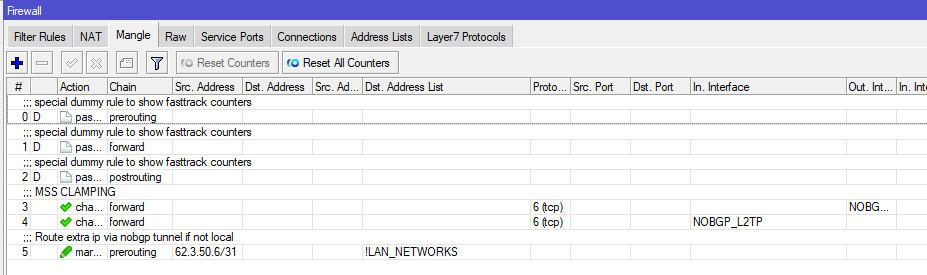
⚠️ Rule Placement and Action are Critical: These mangle rules must be placed after your MSS clamping rule. Additionally, the action must include passthrough=no. Setting passthrough=no is crucial as it instructs the router to stop evaluating subsequent firewall rules for these marked packets, ensuring they are routed immediately and efficiently.
/ip firewall mangle
add action=mark-routing chain=prerouting comment="Route extra ip via nobgp tunnel if not local" dst-address-list=!LAN_NETWORKS new-routing-mark=NOBGP passthrough=no src-address=62.3.50.6/31
Here a screenshot of how it look like at the end
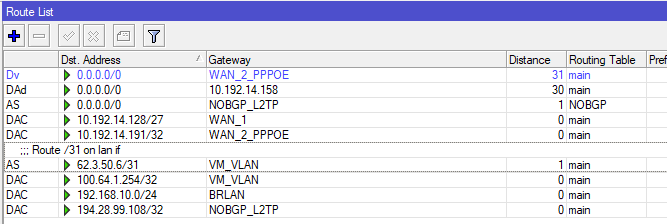
Implementing the static route for the NOBGP IP block
A static route must be configured in the main routing table, directing the entire NOBGP public IP block to the local VLAN interface. All public-IP VMs must reside on this VLAN.
/ip route
add comment="Route /31 on lan if" disabled=no distance=1 dst-address=62.3.50.6/31 gateway=VM_VLAN routing-table=main scope=30 suppress-hw-offload=no target-scope=10
Public ip DHCP
Adding pool for dynamic allocation
If the goal is to allocate public addresses dynamically rather than statically, the first step is to create an IP address pool containing the entire NOBGP extra IP block. This pool will be utilized by the DHCP server to assign IPs to the individual servers/VMs in the DMZ.
/ip pool
add name=POOL_PUB ranges=62.3.50.6/31
Add network configuration
The DHCP Network setup must include the NOBGP public IP range. Crucially, set the netmask to /32 (255.255.255.255). The gateway must be the Far Gateway IP (100.64.1.254) we put on the VLAN interface. This forces servers to send their traffic back to the router, enabling zero IP loss.
/ip dhcp-server network
add address=62.3.50.6/31 dns-server=100.64.1.254 gateway=100.64.1.254 netmask=32
Add dhcp server to the vlan network
/ip dhcp-server
add address-pool=POOL_PUB interface=VM_VLAN lease-time=15m name=DHCP_WAN
Add static lease (optional)
Here an example of static dhcp lease if you plan to use it.
/ip dhcp-server lease
add address=62.3.50.7 mac-address=BC:24:11:73:E3:97 server=DHCP_WAN
Firewall: Allow traffic to vm public ip
Because the public IP is right on the host, the router’s firewall is your main protection. Below shows how to make a filter rule to let traffic (like port 80) reach your NOBGP servers. You can open all traffic or just open specific ports. Warning: Be careful not to expose services like SSH (22) without limiting access.
/ip firewall filter
add action=accept chain=forward comment="All to 62.3.50.6:80 " dst-address=62.3.50.6 dst-port=80 protocol=tcp
add action=accept chain=forward comment="All to 62.3.50.7:80 " dst-address=62.3.50.7 dst-port=80 protocol=tcp
Firewall modification for NOBGP
WARNING: This rule have to be before the drop policy.
Allow packet to goes out via nobgp tunnel
/ip firewall filter
add action=accept chain=forward comment="Allow forward via nobgp internet" out-interface=NOBGP_L2TP
Firewall rules for internal management access
In the final configuration stage, we must add the essential firewall rule that controls internal access.
This rule’s purpose is to grant users on your main private LAN the ability to reach the server DMZ/VLANs. This provide you access to your hosts from your main lan.
Advanced Security: You can always implement specific allow/deny rules to control traffic flow between the separate internal network, tailoring security precisely to host requirements.
/ip firewall filter
add action=accept chain=forward comment="Allow primary lan to access others networks for management" in-interface=BRLAN
Few screenshots of the configuration GUI
Firewall
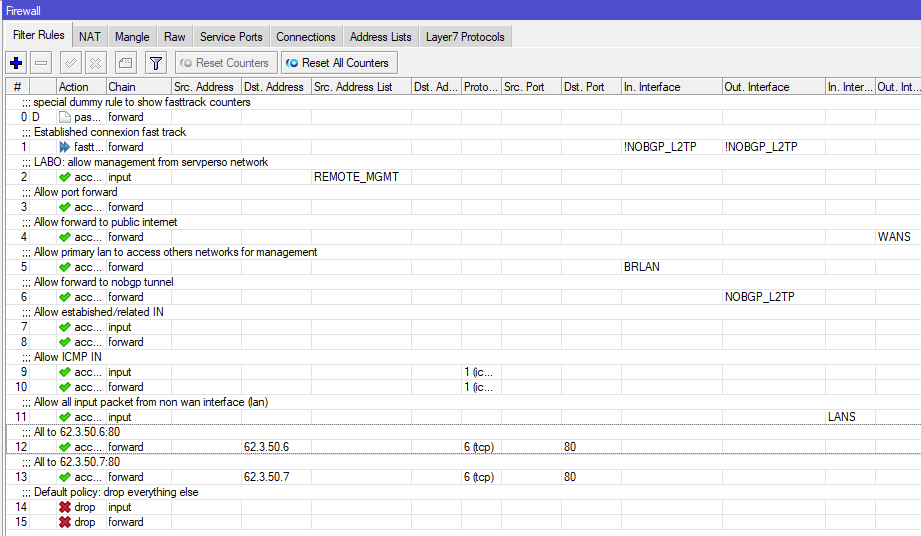
Mangle
Routing table
Full router configuration
# 2025-12-08 15:00:10 by RouterOS 7.20.6
# software id = RETRACTED
#
# model = RBD52G-5HacD2HnD
# serial number = RETRACTED

/interface bridge
add name=BRLAN

/interface ethernet
set [ find default-name=ether1 ] name=WAN_1
set [ find default-name=ether2 ] name=WAN_2

/interface pppoe-client
add add-default-route=yes default-route-distance=31 disabled=no interface=WAN_2 name=WAN_2_PPPOE password=RETRACTED user=RETRACTED

/interface vlan
add interface=BRLAN name=VM_VLAN vlan-id=50

/interface list
add comment="List public interfaces" name=WANS
add comment="List private interface" name=LANS

/interface wireless security-profiles
set [ find default=yes ] supplicant-identity=MikroTik
add authentication-types=wpa2-psk mode=dynamic-keys name=SERVPERSO_LABO_WIFI supplicant-identity="" wpa2-pre-shared-key=RETRACTED

/interface wireless
set [ find default-name=wlan1 ] frequency=auto mode=ap-bridge security-profile=SERVPERSO_WIFI ssid=SERVPERSO_LABO wps-mode=disabled
set [ find default-name=wlan2 ] band=5ghz-n/ac channel-width=20/40mhz-Ce disabled=no frequency=auto mode=ap-bridge security-profile=SERVPERSO_WIFI ssid=SERVPERSO_LABO wps-mode=disabled

/ip pool
add name=POOL_LAN ranges=192.168.10.100-192.168.10.149
add name=POOL_PUB ranges=62.3.50.6/31

/ip dhcp-server
add address-pool=POOL_LAN interface=BRLAN lease-time=8h name=DHCP_LAN
add address-pool=POOL_PUB interface=VM_VLAN lease-time=15m name=DHCP_WAN

/interface l2tp-client
add connect-to=nobgp.servperso.net disabled=no name=NOBGP_L2TP password=RETRACTED profile=default user=RETRACTED

/routing table
add disabled=no fib name=NOBGP

/interface bridge port
add bridge=BRLAN interface=ether3
add bridge=BRLAN interface=wlan2
add bridge=BRLAN interface=wlan1
add bridge=BRLAN interface=ether4
add bridge=BRLAN interface=ether5

/interface list member
add interface=WAN_1 list=WANS
add interface=WAN_2_PPPOE list=WANS
add interface=WAN_2 list=WANS
add interface=BRLAN list=LANS
add interface=VM_VLAN list=LANS

/ip address
add address=192.168.10.254/24 interface=BRLAN network=192.168.10.0
add address=100.64.1.254 interface=VM_VLAN network=100.64.1.254

/ip dhcp-client
add default-route-distance=30 default-route-tables=main interface=WAN_1

/ip dhcp-server lease
add address=62.3.50.7 client-id=ff:11:73:e3:97:0:1:0:1:30:c9:8c:58:bc:24:11:73:e3:97 mac-address=BC:24:11:73:E3:97 server=DHCP_WAN

/ip dhcp-server network
add address=62.3.50.6/31 dns-server=100.64.1.254 gateway=100.64.1.254 netmask=32
add address=192.168.10.0/24 dns-server=192.168.10.254 gateway=192.168.10.254

/ip dns
set allow-remote-requests=yes

/ip firewall address-list
add address=192.168.0.0/16 list=LAN_NETWORKS
add address=62.3.50.6/31 list=LAN_NETWORKS
add address=100.64.1.254 list=LAN_NETWORKS

/ip firewall filter
add action=fasttrack-connection chain=forward comment="Established connexion fast track" connection-state=established,related hw-offload=yes in-interface=!NOBGP_L2TP out-interface=!NOBGP_L2TP
add action=accept chain=forward comment="Allow port forward" connection-nat-state=dstnat
add action=accept chain=forward comment="Allow forward to public internet" out-interface-list=WANS
add action=accept chain=forward comment="Allow primary lan to access others networks for management" in-interface=BRLAN
add action=accept chain=forward comment="Allow forward to nobgp tunnel" out-interface=NOBGP_L2TP
add action=accept chain=input comment="Allow estabished/related IN" connection-state=established,related
add action=accept chain=forward connection-state=established,related
add action=accept chain=input comment="Allow ICMP IN" protocol=icmp
add action=accept chain=forward protocol=icmp
add action=accept chain=input comment="Allow all input packet from non wan interface (lan)" in-interface-list=LANS
add action=accept chain=forward comment="All to 62.3.50.6:80 " dst-address=62.3.50.6 dst-port=80 protocol=tcp
add action=accept chain=forward comment="All to 62.3.50.7:80 " dst-address=62.3.50.7 dst-port=80 protocol=tcp
add action=drop chain=input comment="Default policy: drop everything else"
add action=drop chain=forward

/ip firewall mangle
add action=change-mss chain=forward comment="MSS CLAMPING" new-mss=1400 out-interface=NOBGP_L2TP protocol=tcp tcp-flags=syn tcp-mss=1401-65535
add action=change-mss chain=forward in-interface=NOBGP_L2TP new-mss=1400 protocol=tcp tcp-flags=syn tcp-mss=1401-65535
add action=mark-routing chain=prerouting comment="Route extra ip via nobgp tunnel if not local" dst-address-list=!LAN_NETWORKS new-routing-mark=NOBGP passthrough=no src-address=62.3.50.6/31

/ip firewall nat
add action=masquerade chain=srcnat comment="Source nat masquerade - Internet" out-interface-list=WANS

/ip route
add disabled=no dst-address=0.0.0.0/0 gateway=NOBGP_L2TP routing-table=NOBGP suppress-hw-offload=no
add comment="Route /31 on lan if" disabled=no distance=1 dst-address=62.3.50.6/31 gateway=VM_VLAN routing-table=main scope=30 suppress-hw-offload=no target-scope=10
NOBGP guides
- NOBGP – RouterOS 7: Dedicated public IP per server via DHCP and Far Gateway routing (No IP loss)
- NOBGP – ROS7 – One public ip per VLAN
- NOBGP – POP and supported protocols
- Mikrotik – RouterOS 6 – Full trafic via tunnel + ip pool
Bypass CGNAT & Dynamic IPs: NOBGP static Public IP is directly routed
Discover nobgp by servperso: Static public IPs and IP pools are routed directly to your network via a high-availability VPN tunnel.